Choosing the Best CCTV DVR: A Professional Buyer’s Guide
Nov 26, 2026
Will a replacement cctv dvr work with the cameras and coaxial wiring you already have? A matching connector is not enough: the recorder must also support your cameras’ signal formats. Check these details before choosing a replacement to avoid a setup that fails to record or use the cameras as intended.
When replacing a recorder, it helps to compare channel count, storage, compatibility, and room for future expansion. A DVR receives video from compatible security cameras, records footage locally, and can support remote viewing without a monthly fee. Start by identifying the equipment you plan to keep, then match the recorder to it.
In this guide, we explain how a DVR connects to cameras, which compatibility details to check, and how to think through recording capacity and channel needs. We’ll also cover how to assess whether your current system can support additional cameras. At CCTVSecurityPros, we offer professional-grade DVRs and lifetime technical support to help you choose equipment that fits your system and get more from it.
Key Takeaways
- A cctv dvr must support your cameras’ connection type and video format; a matching BNC connector alone does not establish compatibility.
- Count your current cameras and allow for planned additions when deciding how many recorder channels you need.
- Estimate how long you need to keep footage. Retention depends on storage capacity and recording configuration.
- Compare your existing equipment with a recorder’s requirements before choosing a replacement.
What Is a CCTV DVR and What Does It Do in a Security System?
A digital video recorder (DVR) records video from compatible security cameras. In a CCTV setup, camera signals travel to the recorder, which saves footage to local storage for later playback. A cctv dvr is a central recording component, not a camera or a monitoring service.
Think of the recorder as the system’s hub for camera video. Each camera needs a compatible connection and signal format, and the DVR needs enough supported inputs for the cameras you intend to connect. Two recorders that look similar may support different cameras or functions, so compare their specifications rather than relying on appearance. Our HD CCTV DVR options are designed for compatible CCTV camera systems.
How does a CCTV DVR fit into a camera system?
Each connected camera sends its video signal to an input on the recorder. With compatible HD CCTV equipment, cameras may connect through BNC connections and coaxial cable. The DVR processes the incoming video and writes recordings to its storage drive. You can then use the recorder’s playback controls and a connected display to search and review saved footage.
Local recording and remote access are separate functions. Local recording stores video at the recorder. Remote viewing uses a network connection to let you access the system from another location. Internet access is relevant to remote viewing, not to the basic connection between a camera and a DVR recording locally. Remote access depends on the recorder and how the system is configured.
A recorder also does not automatically provide professional monitoring. It records and provides access to video; monitoring is a separate service. Having footage available for review is different from someone continuously watching the cameras or responding to events.
What does DVR mean in CCTV?
DVR stands for digital video recorder. CCTV means closed-circuit television, a video surveillance setup in which cameras send footage to designated equipment for viewing or recording.
A CCTV DVR is a digital video recorder that captures video from compatible security cameras, stores the footage locally, and lets users play it back.
That distinction helps you identify what to look for. The camera captures the view, the connection carries its signal, and the recorder handles recording and playback. Storage capacity and recording configuration affect how much footage you can retain, while remote access depends on the network setup. Start by identifying your cameras and their connections, then match the recorder to that equipment and the way you plan to use recorded video.
How Does a CCTV DVR Record, Store, and Provide Access to Footage?
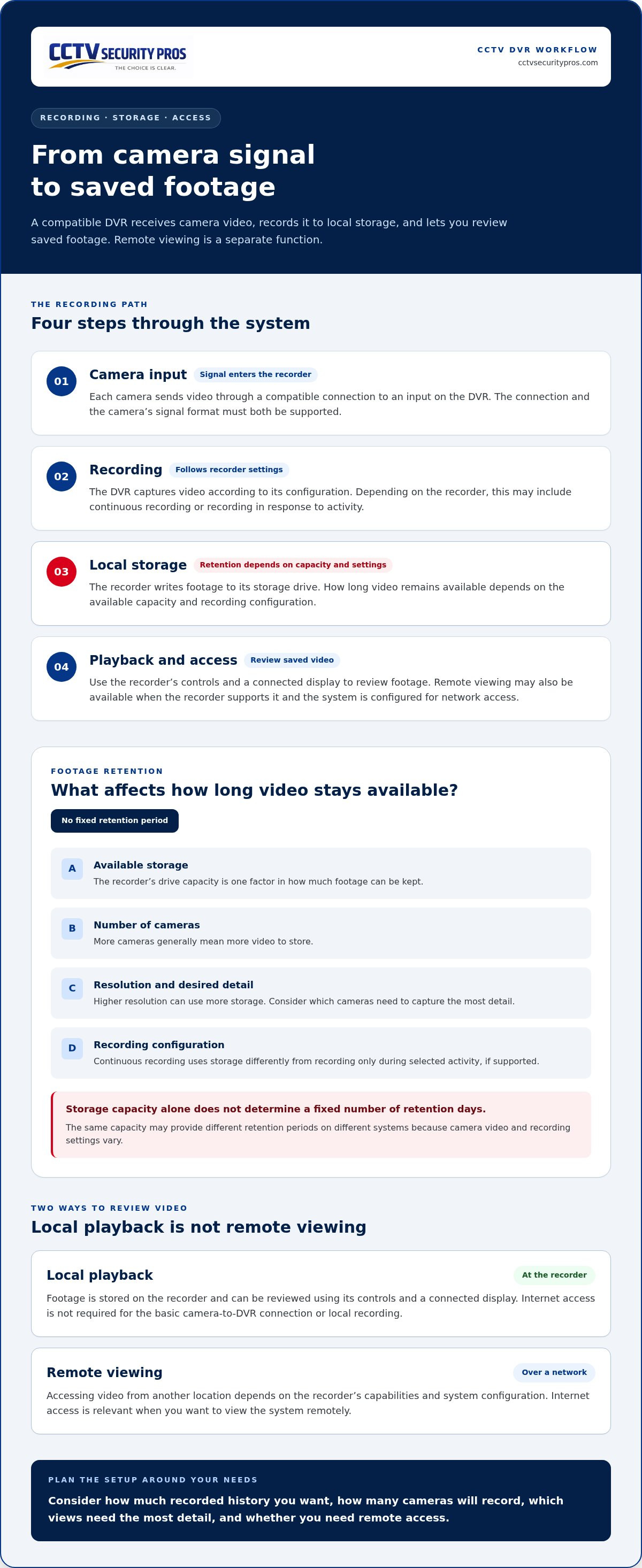
Once compatible cameras are connected, the recorder follows a straightforward process: it receives video, records it to storage, and lets you review saved footage. A cctv dvr records according to its available settings, but the amount of video it can keep depends on its storage and the cameras’ recording configuration. Recording, retention, playback, and remote viewing are connected parts of the system, but each has its own requirements.
- Camera input: Each camera sends its video signal through a compatible connection to a recorder input.
- Recording: The DVR captures video according to its configuration, such as continuous recording or recording in response to activity, if supported.
- Local storage: The recorder writes footage to its storage drive. How long footage remains available depends on capacity and settings.
- Playback and access: You can review saved video at the recorder. Remote access may also let you view it over a network.
Use this process to plan what the system needs to do. If, for example, you need to review events from several days earlier, consider how many cameras will record, how much video they produce, and whether the settings preserve the detail you need. A storage figure by itself does not establish a fixed number of days of retention.
What affects how much footage a DVR can retain?
Retention depends on the amount of video the cameras produce and the recorder’s available storage. More cameras generally mean more video to store, and higher resolution can also use more space. Continuous recording uses storage differently from recording only during selected activity, if that option is supported. The specific effect depends on the equipment and settings, so the same storage capacity will not necessarily provide the same retention period on different systems.
Before choosing storage, decide how much recorded history you want available and which cameras need to capture the most detail. Then compare those priorities with the recorder’s drive capacity and recording options. We can help you understand how HD CCTV DVRs fit into a compatible camera setup.
Can you view DVR footage remotely?
Yes, if the recorder and system setup support remote access. Local playback means viewing footage at the recorder, typically with a connected display and the recorder’s controls. Remote viewing means accessing the system from another location over a network, which may require internet access. The internet is not what makes local recording work; it matters when you want to view the system remotely.
Remote-viewing capabilities vary by recorder and setup, so treat them as a separate requirement when comparing systems. Consider where you expect to review video and whether you need access away from the recorder. Local storage lets the system record without a monthly remote-viewing fee. Network access enables remote viewing when the recorder supports it and the system is configured for it.
Will a CCTV DVR Work with Your Existing Cameras and Coaxial Cable?
A replacement DVR may work with your existing cameras and coaxial cable, but the cable and connector are only part of the compatibility check. The recorder must support the cameras’ video signal format as well as their connection type. A BNC plug can fit a DVR input without proving that the camera’s signal is supported. Check the camera and recorder specifications before replacing equipment or assuming existing coaxial cable will work with a new setup.
Use this comparison as a starting point, then verify the exact camera and recorder documentation. Connection type narrows the options, while supported video formats determine whether the equipment can communicate.
| Connection or setup | Likely DVR fit | What to verify |
|---|---|---|
| BNC camera on coaxial cable | Potential fit with a compatible HD CCTV DVR | Camera video format and DVR format support |
| Camera with a different connection | May require a different recorder type or system | Camera output and recorder input requirements |
| Existing coaxial cable with unknown history | Reuse may be possible | Cable condition, connectors, and signal compatibility |
Which camera and cable details should you check?
Start with the camera. Identify whether it uses a BNC connection and coaxial cable, then find its video format in the camera documentation or system information. Common HD-over-coax formats include TVI, AHD, and CVI. They are not automatically interchangeable, so confirm that the DVR supports the format used by each camera. A BNC connection alone does not identify the signal.
Next, inspect the cable run and connectors. Look for visible damage, loose connections, or signs that a cable needs attention. A cable that appears intact still does not confirm compatibility between camera and recorder, but checking its condition helps you identify wiring issues before installing replacement equipment. Record each camera model and format alongside the cable type before comparing recorders.
When is an HD-over-coax DVR worth considering?
An HD-over-coax DVR is worth considering if your cameras use a supported format and your coaxial cable is suitable for the setup. It can be a practical replacement when compatible cameras and existing wiring are already in place. It does not guarantee that every older camera will work, so confirm each camera’s format and the recorder’s supported inputs first.
If you’re planning a broader upgrade, compare the recorder and cameras as a complete system. Our HD CCTV DVR options suit compatible CCTV camera systems. We can help you make sense of the camera and recorder details so you can choose equipment with confidence.
How to Choose a CCTV DVR: Match Channels, Storage, and System Needs
Choose a recorder by working from your system requirements, not by selecting the largest channel count or storage figure. A cctv dvr must support your cameras and connection type first. Then match its capacity to your camera count, the footage you want to retain, and how you expect to access recordings.
- Identify your cameras and connections. Note each camera’s connection type and video format, then compare those details with the recorder’s supported inputs. This is the first filter: a recorder with plenty of channels still will not suit cameras it cannot support.
- Count current cameras and likely additions. List your active cameras and consider planned expansion. Channel capacity determines how many camera inputs the recorder supports. Your count narrows the options, while your plans help determine whether you need room to add cameras.
- Set your storage and retention priorities. Consider how many cameras will record, which settings you expect to use, and how long you want footage available. These factors work together, so do not rely on a retention estimate that does not reflect your system.
- Decide how you’ll review footage. Think about whether you’ll mainly use playback at the recorder or want remote viewing. Remote access depends on the recorder and the way the system is set up.
- Compare recorder details and support. Review format compatibility, channel capacity, storage configuration, and playback needs together. Compare CCTV DVR recorder options against your requirements instead of focusing on one specification in isolation.
How many DVR channels do you need?
Count every camera you intend to connect, then account for any additions you’re planning. Each channel represents a camera input, so the recorder needs enough capacity for the cameras in your intended setup. Avoid guessing: a simple camera inventory gives you a practical basis for comparing suitable recorders.
Which recorder details matter beyond channel count?
Channel count tells you how many cameras can connect, but not whether their formats are supported or whether the storage arrangement meets your needs. Playback and remote access matter too, depending on how you plan to use footage. Treat compatibility as essential, then prioritize other capabilities according to the installation and your day-to-day requirements.
Before choosing, use this checklist:
- Compatibility: Camera connection and video format match recorder support.
- Capacity: Channels cover the cameras you need, including planned additions.
- Storage: Drive capacity and recording settings suit your retention priorities.
- Access: Playback and remote-viewing capabilities fit how you’ll review footage.
- Support: Technical help is available for setup and product questions.
We offer lifetime technical support to help you understand recorder specifications, compare options, and choose equipment that fits your system.
Find a CCTV DVR That Fits Your Cameras, With Expert Help When Needed
The right recorder fits the system you have and the footage you need, not simply the model with the biggest headline specification. Before choosing, bring the key details together: camera connections and video formats, the number of cameras you use or plan to add, storage needs, and how you expect to review recordings. That gives you a practical basis for comparing options and helps prevent a mismatch between the DVR and your cameras.
At CCTVSecurityPros, we offer professional-grade DVRs and related CCTV equipment. Consider each specification in the context of your installation. Channel capacity should suit your camera count, format support should match your cameras, and storage should reflect your recording settings and retention priorities. Keep the camera and recorder details together as you compare models.
What support and ownership details should buyers consider?
Selection guidance matters, especially if you’re replacing a recorder and want to keep compatible cameras or coaxial cabling. Our team provides unlimited lifetime technical support based in the USA, so you can turn to us for help with product and technical questions. Our products include a three-year warranty. Remote viewing is available without a required monthly subscription fee.
How can we help you select a compatible recorder?
Share what you know about your camera connections, video formats, coaxial cabling, current camera count, and plans for expansion. Those details help us focus on recorders suited to your setup rather than offer a generic recommendation. If you’re unsure of a camera’s format, its model information or a clear description of its connections gives us a useful starting point. We’re here to make the choice clearer.
A careful match helps you get more from the equipment already in place while choosing a recorder that can serve your planned system. Compare the requirements as a whole, then explore our recorder options or talk with our team for help weighing them.
Make Your Next Recorder Choice With Confidence
Before replacing equipment, gather the camera models, connection details, and recorder information you already have. This preparation can turn a confusing set of specifications into a clearer decision, especially if you’re keeping part of an existing system. A well-matched cctv dvr is a practical next step when it suits your setup and the way you plan to use recorded footage.
You don’t need to make the decision by comparing isolated numbers. Look at the complete picture: which cameras will remain, what the system may need to accommodate later, and how you want to review footage. Our team can help you work through the options and find a recorder suited to your requirements. Choose with the system you want to run in mind, not just the equipment you’re replacing.
Explore CCTV DVR recorders and get help choosing
With the right information and expert guidance, you can move ahead confidently and build on the security setup that works for you. Explore our CCTV DVR recorders and contact us for help choosing a system that fits your cameras and recording needs.
Frequently Asked Questions
Can a CCTV DVR record without an internet connection?
Yes, a compatible CCTV DVR can record locally without internet access. The cameras send video to the recorder, which saves it to its local drive. You can usually review footage at the recorder using a connected display, subject to the equipment’s playback options. Internet access is relevant when you want to view footage remotely. A connection outage can interrupt remote access without necessarily stopping local recording.
Can you connect IP cameras to a CCTV DVR?
Sometimes, but only if the recorder specifically supports the IP camera and its connection method. A traditional DVR designed for coax-connected cameras will not automatically accept an IP camera just because both are part of a security system. Some hybrid recorders support more than one camera technology, but supported formats and setup requirements vary. Check the recorder documentation for IP camera support and compatible network connections before planning a mixed-camera installation.
How much storage does a CCTV DVR need?
There is no single storage size for every installation. Estimate your needs based on camera count, video resolution, recording schedule, and how long you want footage available. For a practical starting point, list which cameras must record continuously and which can use a different schedule, if supported. Compare that plan with the recorder’s storage configuration. A retention estimate is meaningful only when it reflects the actual cameras and settings.
What happens when a DVR hard drive is full?
The result depends on the recorder’s settings. Some systems can overwrite the oldest footage to make room for new video; others may stop recording when storage is full. Check the recorder’s settings and manual rather than assuming which behavior applies. Decide whether preserving older footage or continuing to record new events is the priority. Review storage status regularly so you can address capacity limits before they affect recording.
Can I reuse my existing coaxial cable with a new DVR?
Often, existing coaxial cable can be reused if it is in suitable condition and the cameras and recorder support compatible video formats. Inspect the cable run and connectors for damage or loose fittings, then identify the camera models and signal types. A working cable alone does not establish that a camera will communicate with the replacement recorder. Share those details with our team for practical selection guidance.
Do CCTV DVRs require a monthly fee for remote viewing?
No, remote viewing does not always require a monthly subscription. CCTVSecurityPros offers security systems with remote viewing and no required monthly subscription fees. Remote access still depends on the recorder’s capabilities and a suitable network setup. This is separate from local recording, which stores footage at the recorder. Consider whether the specific system supports remote viewing and how you plan to connect to it.